Tuesday, September 10, 2019

You Miss 100% of the Shots You Don't Take! (and Weekend Reading)

In class, we learned some key principles of photographic composition. (See class website for Composition Tutorials - Parts 1 &2.) Students have gathered examples of photographic composition from "freegal" photo sites, and will explore other photographic resources on the site - including a couple of short videos: 7 Powerful Photography Tips and 9 Photo Composition Tips.

 Then students will shoot a number of photos based on the composition rules and tips from class and the course website. Students will post at least SIX photos and discuss the composition principles displayed in each shot.

ALSO - students will read Nicholas Carr's seminal article "Is Google Making Us Stupid?"and will
write a reflective blog on their observations, including discussions on issues like:
  • Difficulty reading printed pages
  • The explosion of available information
  • Nietzsche's typewriter
  • The clock
  • Memory
  • The growth and evolution and influence of Google
  • How will YOUR kids "read?"

Monday, September 9, 2019

Look at This (freegal) Photograph

This image is a single frame from the video "Photograph" performed by Nickleback, copyright holder SMG 2007. This image is used for educational purposes in a class that examines copyright issues, and its use will have no bearing on the value or commercial use of the work from which it was taken.

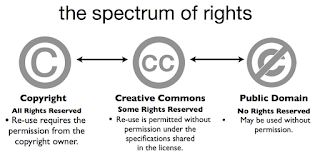
Students in the Digital Literacies Class at Limestone are exploring computer-assisted design, digital publishing, intellectual property licenses, and more. They are finding "freegal" (free and legal-to-use) images, and identifying the licenses from a range of CC, Copyleft, and Public Domain permissions.
**(They are accessing a treasure trove of images via Dr. Nichols' Pinterest Board)

They will also be drafting a "Fair Use Statement" for their use of an image in a class project.


 copyright licenses

What's next? Hmmm... well, students will will explore semiotics in imagery and color, write a sample "Fair Use Statement,"  - and try their hands at Re-making a Magazine ad with "freegal" images.

Wednesday, September 4, 2019

Anthropological Look at YouTube & Cover of the Rolling Stone

Our first few classes have involved a little time travel to see just how significant were some of the shifts facilitated (or caused) by New Media. We have explored artifacts, (including memes and viral videos,) as a way to see how the elements of remediation, meta-generativity, and agency have shaped our 21st-century media landscape.

Students will complete viewing Michael Wesch's lecture "An Anthropological Look at YouTube" and will post their reflections, reactions, and take-aways.

https://www.youtube.com/playlist?list=PLU9WbRHspDEiNhdveASafRrF3M8dmL6WoAdditionally, student will explicate an assigned song from a playlist - researching the hisory of the song, examining the lyrics, and deriving an interpretation of how the song speaks about the state (or history) of the Music Industry. Students will post their reflections, along with lyrics, links, or video in their blogs.

(Cheat: I did one of the songs a couple years ago - you can get the idea of what I'm looking for here.)

Tuesday, August 27, 2019

First Assignment: Reading on Screens

For our first reading/thinking/blogging assignment, students will post their thoughts and reflections on two articles:

  1. Everything Science Knows About Reading on Screens by Annie Sneed
  2. Reading in a Whole New Way by Kevin Kelly
Students will experiment with a few interactive digital artifacts as they explore the affordances new media brings to composition and reception of electronic "texts."

Check the Blog List to the right to see their posts!

All the Answers to the Final Exam are here!

Welcome to CM10 - Fall 2019!

This is the Instructor's Blog - or as we will call it, the Class Blog. You will check here for reminders of assignments, summary instructions, and other feedback from the Professor. This page will also feature links to your colleagues in this section (and to colleagues who have gone on before you.)

You could think of this as a "hub" for our class bloggers, but in reality, each of your own sites will, in pretty short order, be "hubs" of their own, connecting with your colleagues.

The main site for resources will be our Limestone Digital Class Website. (Blackboard contains only syllabus, but it is hyperlinked to these sites and other digital resources.)

Bookmark this blog site, as well as the class website, and you will be off and running!

Now let's get this show on the road...

Thursday, April 25, 2019

Museum Reception, Defense Review, and Portfolio Reminder

CM412 students will be finishing video resumes, and will move quickly on to adding it to their website, and finalizing their digital portfolios.

On Tuesday, the class will meet to review the expectations for the "Portfolio Defense" to be held during Final Exam time, (Monday, May 6, 11:00am-1:30pm.)

On Tuesday, we will also discuss last minute preparations for the Tuesday night "VR Tour Launch" event at the Cherokee County History & Arts Museum - which runs from 5:30pm to 6:30pm.

Tuesday, April 2, 2019

Final VR Shoot & Digital Addenda

The CM 412 students will be re-shooting the spherical images for the VR tour, and will also be planning embedded "Close-Ups" for visitors the the Cherokee County Virtual Museum.

Students will complete the following field work:
  1. Re-shoot images with proper orientation to match the site-map.
  2. Take portrait-oriented 2D photos of a selected close-up" or highlight within an assigned area.
  3. Writing a shot (25-45 words) description of teaser of that highlighted artifact.
 After the shoot, students will complete the following production work in lab:
  1. Rename spherical images to match the site map.
  2. Create a New Tour and import images into theViewer platform. https://theviewer.co/
  3. Set the "landing pano," and insert "warps" as need for transporting the audience.
  4. Resize "close-up" images to match the constraints of the medium.  (Hint: begin with 300px wide)
  5. Use the "add an image" button to place the close-up image for viewers.
  6. Compose the text for the short description of the close-up feature, and use the "add info spot" feature to place the text for the visitors to see.
  7. Corporately review the tour - make change as needed.
  8. Publish the tour.
  9. Insert the LINK as well as the TOUR via EMBED CODE.