Wednesday, March 13, 2019

The World Wide Web Turns 30 - What's Next #ForTheWeb ?

Thirty years ago - on March 12, 1989 - Tim Berners-Lee submitted a proposal for a way to use the (then in its infancy) internet to more easily share information via something called "hyper-text."
Berners-Lee's proposal - with comments from supervisor: "Vague, but exciting."

The world wide web was born, and things would never be the same. Anyone younger than 30 has never known a world with out the World Wide Web, and would probably find it hard to conceive of such an existence. In fact, the World Wide Web is, for many "users," taken for granted, accepted as a fact of life, a default reality. But passive acceptance of the Web, and uncritical consumption of its content poses some really big problems.

I encourage my Digital Communications students to THINK about their work as digital communicators from different perspectives, and to sometimes step back and look at the big picture. One way to do this is to read this short piece by Berners-Lee called "30 years on, What's Next for the Web?" Read, reflect, respond, and THINK.

Sir Tim Berners Lee arriving at the Guildhall to receive
the Honorary Freedom of the City of London
(Photo by Paul Clark - CC 4.0)

Tuesday, February 26, 2019

Our Spring Term Client: Cherokee County History & Arts Museum

Cherokee County History & Arts Museum

Students from Dr. Nichols' Digital Literacies II class have begun work on a 3D-360 Virtual Tour for the Cherokee County History and Arts Museum.

Students, in collaboration with Museum Directors and Curators, are making plans to build a Virtual Tour of the museum, and will begin shooting spherical (3D-360) imagery with VR cameras, and building the navigational elements using theViewer software. The Virtual Museum Tour will be available on the museum website, and can be viewed using a web browser, smartphones, or VR headsets.


Students will also work with museum staff to refresh the social media presence of the museum, launch a promotional campaign for the VR Tour, host a celebratory on-site event, and build a social media dashboard for the organization. The Virtual Tour is expected to launch April 2019.

Monday, February 25, 2019

Mid-term Status Report

At mid-term in the Digital Literacies II course, students will review the work they've done to this point, and will post a blog containing surveying their work in the first half of the term.

A) Each student will post links to their work on 10 assignments:

  1. Machinima and remix – link to blog reflections and examples
  2. Video Editing – link to blog entries with baseball intro + at least 2 other video clips and reflections
  3. Camera Shots Vocabulary – link to  shooting the vocabulary video and reflections
  4. Using a Shot List – link to blog with music video, documents and reflections
  5. What is the state of VR in 2019? link to blog entry with research links
  6. 360 Photography – link to 2 sets of Cardboard Camera shots and reflections
  7. Interview and Lighting Basics – link to notes & 2 interview video examples
  8. Updated Resume – link to resume on website
  9. Script and Shot List for Digital Video Resume – submit via print, email, or link
  10. Updated Portfolio – link to portfolio on website (provide short explanation of recent changes)
B) Each student will also post a short, but thoughtful, general reflection on their work at mid-term, considering questions such as:
  • How has my work helped me understand more about the world of digital communication? 
  • In what areas do I have a natural "knack," or enjoyment, or frustration, or interest?
  • How do I envision using my knowledge from CM410 and CM412 in my career?
  • What professionalism goals will I set for myself for the remainder of the term?
  • Etc.?
They will post their responses and reflections BEFORE Thursday at 1:50 pm.


Thursday, February 14, 2019

VR Photography Trial Run!

Students will shoot some photographs in 360/3D and contemplate how the new medium demands new grammars.

Download and set up Google's Cardboard Camera on your Smartphone.
Take 5 360/3D photos around campus, activities, home, etc. and post them to your blog.

Here's how to post 360 Cardboard Camera pics to your blog or website.
Go to https://sphcst.com/upload and post your pics.
Use the SHARE button (bottom left) to bring up the embed code.
Place the embed code in the HTML code of your blog to post interactive 360 photos.


Post a few thoughts on your photos, answering such questions as:

  • How do I use existing rules of photography to take good pics in 360?
  • What rules no longer obtain in the new medium?
  • What are some issues I need to address with new grammars?
 We will also compare Cardboard Camera 360 photos with spherical images like this (shot with a Theta S camera) spherical image:

Limestone College Digital Literacies students prepare to work in Virtual Reality! #mylimestone #theta360 - Spherical Image - RICOH THETA

Thursday, January 31, 2019

Storyboards, Shotlists, and Production

Students will hone their editing chops by producing a "music video" using song lyrics and "freegal" video & photo resources. This will help develop a simple planning process for editing (which can be transferred to shooting video, too.)
  1. Students will select a song to make into a video, and will script out the lyrics (with time codes) in a table to create a "shot list."
  2. Students will complete the table with a description of what images they want for each lyrical segment, making a "shopping list" for video footage and photos, etc.
  3. Students will begin "shopping" for "freegal" visual collateral, saving all assets in a folder dedicated to the project.
  4. Along the way, students should keep records of the assets which require attribution, (e.g. CC BY licenses.)
  5. Students will revise their shot list based on the images they actually chose to use, making the list into a Video Editing Guide - which will guide their editing in the lab.
  6. Students should refresh their knowledge of copyright laws and Fair Use guidelines to discuss how such materials may or may not be used.
Below is an example of a couple minutes of a music video of Mary Chapin Carpenter's "I am a Town"  using CC 0 (Public Domain) image resources from the Library of Congress and Wikimedia Commons, and video footage licensed through VideoBlocks, and a few CC BY images from VisualHunt (which will be acknowledge in the credits of the finished video.)


The Shot List / Editing List looks like this:


Wednesday, January 30, 2019

Know Your Camera - and Camera Shots!

Students will acquaint themselves with their newly-assigned digital cameras - or the photo features of their smartphones - learnign the ins and outs of settings, downloads, footage organization, etc.

Then, they will produce a "Video Vocabulary" consisting of examples of the following shots:

(CC0 - Pixabay.com)
  1. Wide Shots (Wide, Very Wide, and Extremely Wide)
  2. Mid-shot
  3. Medium Close Shot
  4. Close-up
  5. Extreme Close-up
  6. Cut-ins & Cut-aways
  7. Two Shot
  8. Over the Shoulder Shot
  9. Noddy Shot
  10. POV Shot
Shots shoudl be about 6 seconds each to illustrate the angles an characteristics of each shot - and SHOULD be labeled with TITLES over each shot.

Students will export the video and post on YouTube - and will embed the YouTube video in their blogs with comments.

Next class session they will add camera movement shots to the "Video Vocabulary" to to video project
  1. Dolly Shot (aka Trucking or Tracking)
  2. Pan (left/right)
  3. Tilt (up/down)
  4. Following Shot
  5. Zoom (in/out) 
Examples can be seen here: http://www.mediacollege.com/video/shots/ 

Monday, November 12, 2018

Using Internet Tools to Study Web Sources about Social Media

Talk about META...

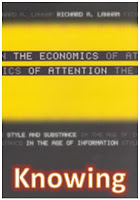
Students in Digital Literacies will be developing tactics to handle the constant deluge that is our modern digital reality. They will read: an Interview with Richard Lanham, and "Untangling the Web Through Digital Aggregation and Curation."

They will apply their knowledge into developing a strategy for handling the daily flood of digital information. They will polish heir social media profiles and set up HootSuite to handle their daily social media interactions.

Then, they will set up Flipboard to aggregate research from contemporary sources; then they will set up a Pinterest board to curate their relevant findings from the resources they discovered from Flipboard.

Their research topic for Aggregating and Curating is SOCIAL MEDIA.


http://limestonedigital.weebly.com/cm410-resources.htmlhttp://limestonedigital.weebly.com/cm410-resources.html